
Tired of the mental gymnastics of writing out a number like `12,550.75` on a check? Manually converting numerical values into English words is tedious, prone to errors, and crucial to get right. Our free Numbers to Words Converter automates this process with perfect accuracy. In seconds, transform any number—from a simple integer to a complex decimal—into the precise text you need for any formal or financial document. It’s the easiest, most reliable online tool for ensuring clarity and professionalism.
Numbers to Words Converter
Convert numbers to words with currency support, transform text, find duplicates, and more with our versatile online tools
Convert Numbers to Words
Enter a number below and convert it to its English representation with currency support
Text Transformation Tools
Transform your text with various styles and effects
Duplicate List Item Finder
Find and count duplicate items in your list
Text to Hexadecimal Converter
Convert text to its hexadecimal representation
What is a Numbers to Words Converter?
A Numbers to Words Converter translates numerical figures into their written word equivalents in English. It’s essential for eliminating ambiguity and preventing costly mistakes in formal contexts.
- Translates digits to words automatically
- Follows grammatical rules and place value logic
- Prevents errors in financial documents
Key Features
Our tool is engineered for versatility and reliability with these key features:
- Convert numbers with precision
- Multiple text case options
- Instant, 100% free online tool
- User-friendly interface
Practical Use Cases
Who benefits from this tool? The answer is almost anyone who deals with official or financial data.
- Financial documents (checks, invoices)
- Legal and official records
- Educational and administrative tasks
- Contracts and agreements
What is a Numbers to Words Converter?
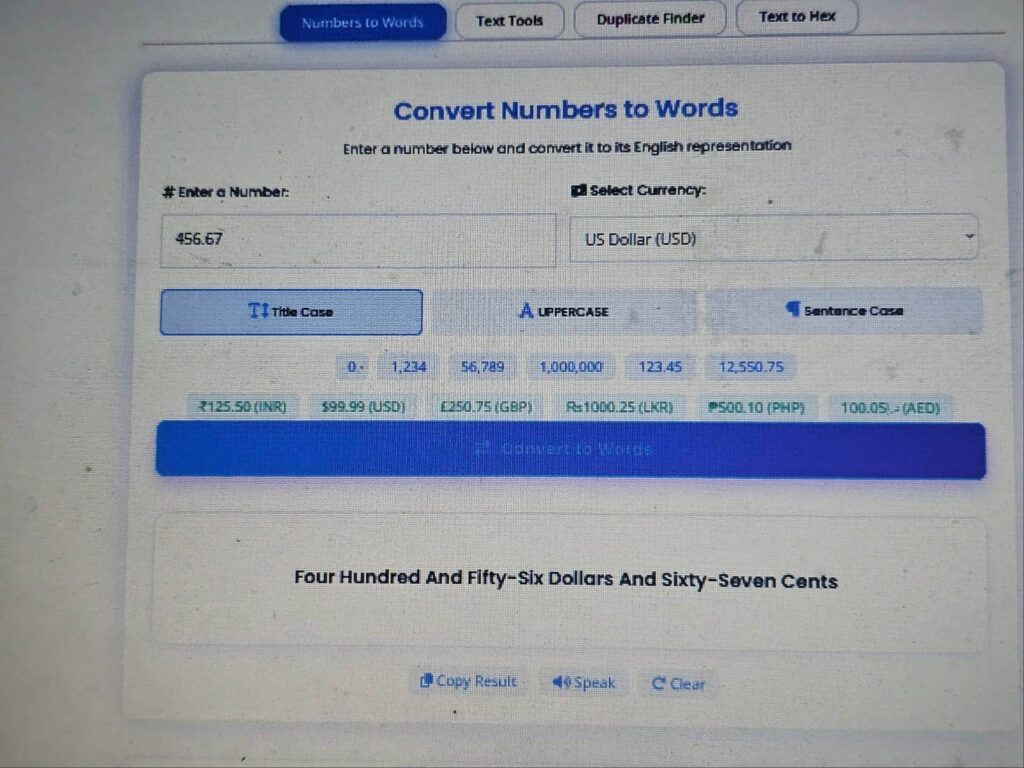
A Numbers to Words Converter is a specialized digital tool that translates numerical figures (digits) into their written word equivalents in the English language. Think of it as a smart translator for numerals. Instead of you figuring out that `1,250` becomes “One Thousand Two Hundred Fifty,” the tool does it automatically, following the grammatical rules and place value logic flawlessly. This is essential for eliminating ambiguity and preventing costly mistakes in formal contexts where the written word is the legally binding representation of the number.
Key Features of Our Number to Words Converter
Our tool is engineered for versatility and reliability. Here’s what makes it the best choice:
Convert Numbers with Precision: Handles everything from simple integers to complex figures with decimal fractions, ensuring accuracy for any value you input.
Multiple Text Case Options:Format your output to meet various standards. Choose Uppercase (ONE THOUSAND) for emphatic fields, Title Case (One Thousand) for checks and formal documents, or sentence case for general use.
Instant, 100% Free Online Tool: Get results the moment you press convert. There are no hidden costs, no registration walls, and no limitations—just a powerful utility available to everyone.
User-Friendly Interface: With a simple input field and clear, intuitive buttons, the tool is accessible for everyone, regardless of technical skill.
How to Convert Numbers to Words in 3 Simple Steps
Using our converter is as easy as 1-2-3. Follow this step-by-step guide to get your result in seconds.
1. Enter the Numerical Value: Type or paste the number you want to convert (e.g., `2,500.50`) into the input field.
2. Select Your Output Format: Choose your preferred text formatting, such as Title Case or Uppercase, depending on your document’s requirements.
3. Get Your Result: Click “Convert” and instantly receive the accurately written form. Copy the text and paste it directly into your check, invoice, or contract.
Practical Use Cases for a Numbers to Words Converter
Who benefits from this tool? The answer is almost anyone who deals with official or financial data. Here are the most common and critical use cases:
Financial Documents: Ensure clarity and prevent fraud on checks, invoices, and bank drafts. Writing the amount in words is a standard practice to avoid alteration and errors, making this a non-negotiable tool for small businesses and individuals.
Check Writing & Financial Organization
Product: Heavy-Duty Checkbook Register
Keep your finances perfectly tracked with this durable register that prevents ink bleeding and lays flat for easy use.
Legal and Official Records: Formal contracts, deeds, and agreements often require numerical values to be written out as English words to prevent misinterpretation. Our tool guarantees you meet these legal compliance standards.
Educational and Administrative Tasks:Students can use it to learn about place value and number names, while administrative staff can streamline the creation of clear, unambiguous reports and records.
“Authoritative guide on how to write a check“
Why Use Our Online Tool to Convert Words from Numbers?
In a world full of online utilities, our converter stands out by focusing on what matters most: reliability and user experience.
Accuracy You Can Trust: We understand that a single mistake can be costly. Our Numbers to Words Converter is built on robust logic that guarantees every conversion is grammatically and numerically correct, which is vital for financial documents and legal work.
Designed for Real-World Use Cases: The flexibility to output text in Title Case or Uppercase isn’t just a feature; it’s a necessity for meeting the specific formatting requirements of different institutions and document types.
A Truly Free and Efficient Online Tool: We believe in providing immediate value without barriers. This commitment to a free, fast, and ad-light experience is central to our goal of enhancing your productivity.
Frequently Asked Questions
1.How do I convert numbers with decimals?
A.Simply enter the full number with the decimal point. For example, entering `123.45` will output “One Hundred Twenty-Three and Forty-Five Cents” (or the equivalent in your selected currency format). The tool expertly handles the decimal part to ensure perfect representation for currency.
2.What is the difference between Title Case and Uppercase?
A.Title Case capitalizes the first letter of each word (e.g., One Thousand Two Hundred), which is the standard for writing checks and most formal documents. Uppercase capitalizes every letter (e.g., ONE THOUSAND TWO HUNDRED), which is sometimes used for emphasis in specific financial fields.
3.Is this tool really free?
A.Yes, absolutely. This online tool is completely free to use. You can convert numbers as often as you need, with no hidden costs or feature restrictions. Our goal is to provide a reliable public utility.
Convert Your Numerical Values Accurately Today
Stop second-guessing your numbers and wasting time on manual conversions. Whether you’re finalizing a critical financial document or simply helping with homework, our Numbers to Words Converter provides the accuracy, speed, and flexibility you need.
Use the free tool above to convert your numbers with confidence now!
Learn More About Number Systems
If you’re interested in the linguistics and rules behind number names in English, you can read about English numerals on Wikipedia.